
Shopping List - Simple & Easy
Opulogic IncShopping
4.55.49K Reviews
- Version
- 3.30
- Installs
- 1.00M
- Age Rating
- Everyone
Screenshots
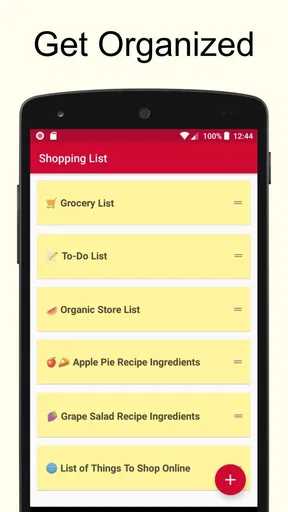
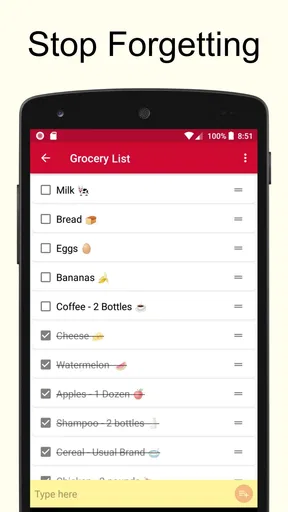
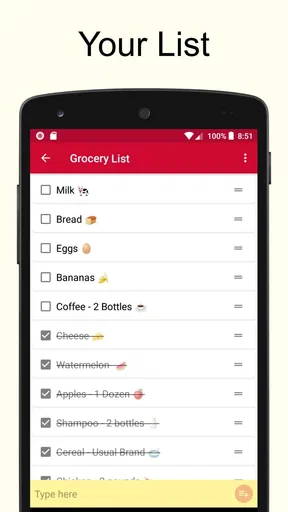
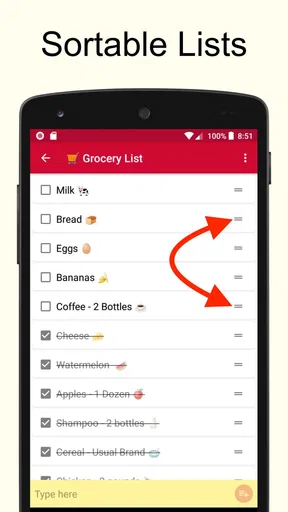
Our Review of Shopping List - Simple & Easy
 Analysis by Appyee
I judge a shopping-list app less by how impressive it feels on day one than by whether I still bother opening it weeks later. Shopping List - Simple & Easy aims to make the ordinary grocery run easier to organize, and its appeal is precisely that it does not ask you to turn shopping into a larger project. For a quick list of food and household basics, that restraint can be useful. The real test is whether a simple routine suits the way you shop—and whether you can keep the list tidy enough to trust.
Why it feels useful in the first week
When I start using a list app, I want to record an item before I forget it, then find it quickly while I’m in a shop. The basic approach here is approachable: add what you need, group items into categories, and keep separate lists for different stores if that matches your routine. Those choices are practical from the outset because they help turn a vague reminder into something you can act on in the aisle.
The app is a free shopping tool from Opulogic Inc, and it has a 4.5 average from around 27,000 ratings, with over a million installs. That level of adoption makes it a familiar option in a crowded category, but it does not mean it will suit every household. Its Everyone age rating also fits the everyday nature of a shared grocery task. The useful question is less whether it has a long list of features and more whether its way of keeping track fits your habits.
Making a list match the way you shop
Categories can help most when you use them consistently. If I group fruit and vegetables together, then dairy and pantry goods, I can scan the list in roughly the order I walk through a familiar shop. It is not necessary to build an elaborate system: a few useful groups are often easier to maintain than a perfectly organized catalogue. If a category choice starts taking longer than adding the item, I would keep the setup simpler.
Separate lists for different stores are handy when one trip covers groceries and another covers a specialist shop. They also create a small trade-off: more lists can mean less rummaging, but only if I remember which one I meant to update. I would give each list a plain, unmistakable name and avoid making a separate list for every occasional errand. That keeps the app from becoming another place where unfinished plans collect.
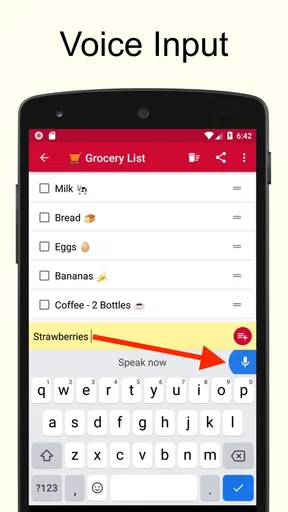
Quantities and notes help with the items that are easy to get wrong. “Apples” may be enough for a quick top-up, while a quantity or a note can clarify what the household actually needs. Voice input is useful when my hands are occupied or when I think of an item while doing something else. I would still take a moment to check what was added before relying on it at the store; a spoken reminder only helps if it has captured the item I intended.
Sharing works best with a clear household routine
Shared lists are most valuable when two people might shop for the same home. Sending a list by text or email gives someone else a way to see what is needed, and the described real-time syncing can help keep changes visible to everyone using it. That can reduce the familiar problem of buying something another person already picked up, or discovering that a last-minute request stayed on someone’s phone.
For a household, I would agree on one simple habit: add things when they run low, rather than trying to remember everything just before leaving. It also helps to be clear about whether a checked-off item means “bought” or “no longer needed.” The app can support coordination, but it cannot settle that small human ambiguity for you. If a family needs assignments, detailed reminders, or a more structured meal-planning system, a basic list may feel too limited.
What it is like to use repeatedly
The uncluttered design makes the first steps easy, and the core actions described for the app—adding items, organizing them, and sharing a list—are the ones many shoppers need most. I like that this keeps attention on the shopping rather than on configuring a workspace. The current version is 3.14, and the app is listed for devices running Android 8.0 or later. It is also available on iOS, so it may suit people who use different kinds of phones, though I would not assume that every detail of the experience is identical across platforms.
Recurring value comes from having the same dependable place to put reminders. A grocery list can be especially useful for repeat purchases: when coffee, rice, or cleaning supplies run low, I can add them immediately instead of trusting my memory at the next shop. For a regular weekly trip, that small habit may save more effort than any fancy planning feature. On the other hand, if I shop spontaneously and buy only a couple of things at a time, opening an app for each errand may feel like unnecessary upkeep.
Maintenance is modest but not zero. Old items need to come off the list, store lists should stay distinguishable, and quantities or notes need to reflect what is actually required. A list that has accumulated forgotten entries becomes less trustworthy, which is the point at which I am most likely to stop checking it. I would clear completed shopping regularly and keep recurring staples in a format that is quick to review, rather than repeatedly rebuilding a complicated list.
Where a simple list can fall short
The app’s focused approach is also its main limitation. It is designed around shopping lists, not a full system for tracking pantry stock, planning meals, comparing prices, or managing a household budget. If those are the reasons I want an app, I would look for a tool built around those needs rather than expect a straightforward list to cover them. A notes app can be enough for someone who wants a single, informal checklist, while a more feature-rich grocery organizer may be a better fit for someone coordinating lots of recipes and shopping details.
Sharing is useful, but it should not be mistaken for a complete household workflow. A shared list still depends on people remembering to update it and checking that they are looking at the right store. Likewise, categories are only helpful if they reflect the way I navigate a shop; too many finely divided groups can slow down entry and make the list harder to scan. My advice is to start with the smallest setup that solves a real problem, then add structure only when you notice a specific need.
The app is free to download, with in-app purchases ranging from $1.99 to $2.99 per item. That makes it worth checking the purchase details in the app if you are considering anything beyond the free use. I would not choose it on the assumption that every possible option is included at no cost; instead, I would first see whether the basic list-making routine is enough for me. If it is, there may be no reason to complicate a task that should remain quick.
A realistic week of use
Imagine noticing on Tuesday that the last carton of oat milk is nearly gone. I add it then, along with a note if the brand or size matters, rather than hoping I remember on Saturday. Before the weekend trip, I check the list, group the remaining food and household items in a way that makes sense for that shop, and share it if someone else might go first. If they pick something up, the shared list can help prevent a duplicate; when I get to the store, I can work through what remains and clear the completed items afterward.
The useful insight in that routine is that the app works best as a running capture point, not as a list-making chore reserved for the night before shopping. I would also avoid adding every possible future purchase. Keeping the list limited to items that are genuinely needed makes it faster to review and reduces the chance of treating an old note as a current request. For occasional purchases that are not urgent, a separate store list can help, provided I check it before making the trip.
Who should keep it, and who should look elsewhere
I can see this being a good fit for someone who wants a low-friction grocery checklist, makes repeat trips, and values straightforward sharing or organization more than detailed planning. It can also help a student managing a small set of staples, a parent keeping track of several household requests, or a couple who often split shopping. The strongest reason to keep using it is not novelty; it is the quiet convenience of having one familiar place to capture what has run out.
I would skip it if I rarely shop with a prepared list, dislike maintaining digital reminders, or need the list to do more than hold and organize items. Someone who already has a notes app that is quick to open may not gain much by switching. A shopper who wants recipes, inventory tracking, or budget tools should compare apps that make those functions central. The best choice depends on whether the problem is forgetting items or managing a more involved food routine.
Does it earn lasting space?
Shopping List - Simple & Easy earns its place when I use it as a small habit: add an item as soon as I notice it is missing, keep categories sensible, and clear the list after shopping. It does not remove the need for household communication or careful checking, and its focused nature will not satisfy everyone. But for a person who wants a practical list without turning grocery planning into a project, that focus is a genuine strength.
My long-term verdict is that it is worth trying if your main goal is to remember what to buy and make a shared or multi-store routine easier to follow. The free starting point keeps the commitment low, while the app’s simple scope makes it easy to judge whether it fits your week. I would keep it only if I found myself using it before each trip—not because a new app feels appealing, but because it reliably saves me from arriving home without the one thing I went out to get.
Getting Started with Shopping List - Simple & Easy
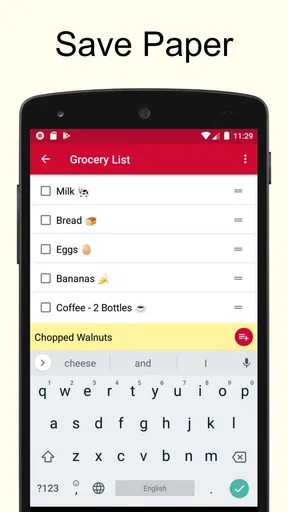
First things first, downloading the app was a breeze. It’s available on both Android and iOS, so no worries if you’re team Apple or Android. Once installed, setting up was straightforward. You’re greeted with a clean, minimalistic interface that’s all about functionality. No unnecessary bells and whistles, just a simple layout that’s easy on the eyes.
Creating and Managing Lists
Adding items to your shopping list is as easy as pie. You simply tap to add a new item, type in what you need, and it’s there. One feature I really appreciated is the ability to categorize items. Whether it’s dairy, produce, or pantry staples, organizing your list makes the shopping experience much smoother. And if you’re a regular at multiple stores, the app allows you to create different lists for each one.
A neat touch is the option to add quantities and notes. So, if you need five Granny Smith apples or a reminder that you’re out of oat milk, you’re covered. The app also supports voice input, so if you’re juggling kids or just too busy, you can speak your list into existence. How cool is that?
Sharing and Syncing Made Easy
One of the standout features is the ability to share your list with family or friends. Whether you’re planning a party or just need someone to pick up a few things, sharing is seamless. You simply send the list via text or email, and voila, everyone’s on the same page. Plus, the list syncs in real-time, so if someone adds or checks off an item, everyone else sees it instantly.
Usability and Design
The design of the Shopping List - Simple & Easy app is, well, simple and easy. The app focuses on utility rather than flashy graphics, which I personally find refreshing. The user experience is incredibly intuitive. You won’t need a manual to navigate this app, and that’s a huge plus in my book. The text is clear, the buttons are responsive, and there’s zero clutter.
Performance and Reliability
In terms of performance, the app runs smoothly. I didn’t encounter any crashes or lags, which can sometimes plague shopping apps. Even with a long list, the app handled everything like a champ. It’s lightweight, so it doesn’t hog your phone’s resources, and I noticed no significant battery drain. Reliability is key in a shopping app, and this one doesn’t disappoint.
Final Thoughts
So, what’s the verdict? The Shopping List - Simple & Easy app is a fantastic tool for anyone looking to streamline their grocery shopping. It’s not only user-friendly but also packed with practical features that make shopping less of a chore. Whether you’re a busy parent, a college student, or just someone trying to get organized, this app is a must-try.
With its easy setup, real-time syncing, and ability to categorize items, it truly lives up to its name. It’s a digital companion I didn’t know I needed, but now can’t shop without. So, next time you’re planning a grocery run, give this app a whirl. You might just find it’s the shopping sidekick you’ve been waiting for.
Verdict
Strengths of Shopping List - Simple & Easy
- User-friendly interface simplifies list creation.
- Quickly add items with voice input feature.
- Supports multiple lists for different needs.
- Offline access ensures usability anytime.
- Customizable categories for better organization.
Limitations of Shopping List - Simple & Easy
- Lacks integration with major grocery apps.
- No price tracking for budget-conscious users.
- Limited sharing options with other platforms.
- Ads can be distracting during use.
- No option for barcode scanning of items.
Similar Picks in This Category
View All
SHEIN-Shopping Online
Roadget Business PTE. LTD.4.8

Amazon Shopping
Amazon Mobile LLC4.4


Mercado Libre: Compras online
Mercado Libre4.8

Wish: Shop and Save
Wish US Holdings LLC4.7

Alibaba.com - B2B marketplace
Alibaba Mobile4.4
Frequently Asked Questions
What features does Shopping List - Simple & Easy offer?
Shopping List - Simple & Easy provides a straightforward interface for creating and managing your shopping lists. Features include the ability to add items quickly, categorize them for easy access, share lists with others, and synchronize across devices. It also supports voice input and offers reminders for essential items, ensuring a seamless shopping experience.
Is Shopping List - Simple & Easy compatible with both Android and iOS devices?
Yes, Shopping List - Simple & Easy is compatible with both Android and iOS devices. The app is designed to function smoothly on a wide range of devices, ensuring that users can access their shopping lists anytime, anywhere. It supports synchronization across platforms so you can switch between devices without losing any data.
Does Shopping List - Simple & Easy require an internet connection to function?
Shopping List - Simple & Easy primarily functions offline, allowing you to create and edit lists without an internet connection. However, to sync lists across devices or share them with others, an internet connection is necessary. This flexibility ensures that you can access your lists even in areas with limited connectivity.
Is there a cost associated with using Shopping List - Simple & Easy?
Shopping List - Simple & Easy is available for free with basic features. However, it offers in-app purchases for premium features such as ad removal, enhanced customization options, and additional list management tools. These premium features are optional and designed to enhance user experience without limiting the core functionalities.
How user-friendly is Shopping List - Simple & Easy for beginners?
Shopping List - Simple & Easy is designed with simplicity and ease of use in mind, making it highly user-friendly for beginners. The intuitive interface allows users to start creating lists immediately without a steep learning curve. Helpful tooltips and a clean layout ensure that users can navigate the app effortlessly.
